
Copy this year's event for next year
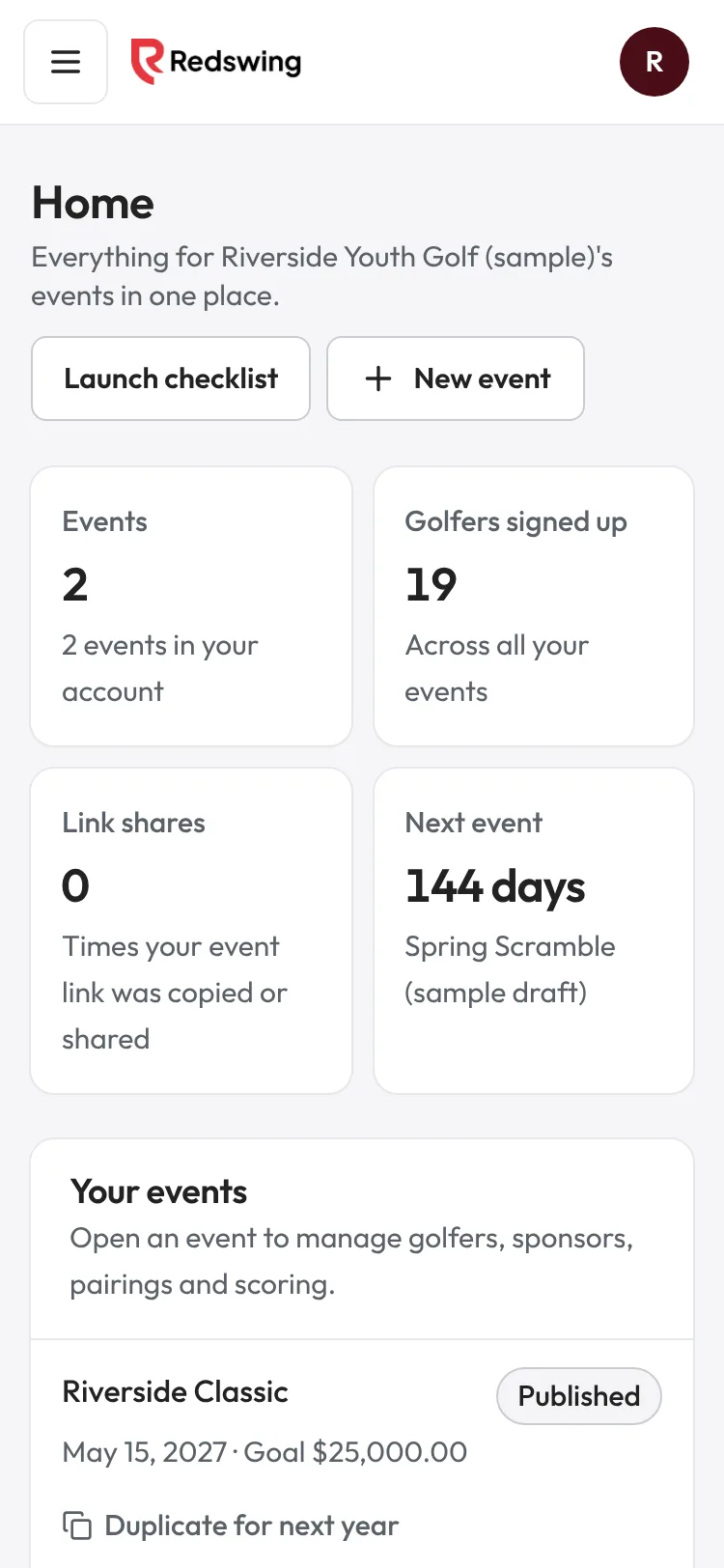
Step 1 of 2: On Home, find last year's event and tap Duplicate.
Sample event. Not real data.
Start next year's event from this year's in one tap.
Who can do this: admins and editors.
Steps
- Go to Home in the main sidebar.
- Find last year's event in your list and tap Duplicate (on a phone, Duplicate for next year).
- The new draft opens. Check the name, date and price under Event settings.
- Publish it when you're ready.
What's copied
- Settings, page design, emails, price, format and questions.
- Sponsor packages, add-ons, auction items (without bids or winners) and contests (without winners).
- The date moves one year later, and the sign-up closing date keeps the same distance before the event.
- The name ends with next year (for example "Riverside Classic 2027").
What's not copied
Golfers, payments, scores, pairings, sponsors who bought, donations and discount codes.
Good to know
- The new event has a new link. Last year's link still opens last year's event. Share the new link, and update any website or flyer.
- It starts as a draft, so nobody can sign up until you publish.
Common problems
| What you see | What to do |
|---|---|
| We couldn't copy that event. | Nothing was changed. Try again. |
| The date is wrong | Change it in Event settings. |
Screenshots show a sample event. Not real data.