
Score your group, hole by hole
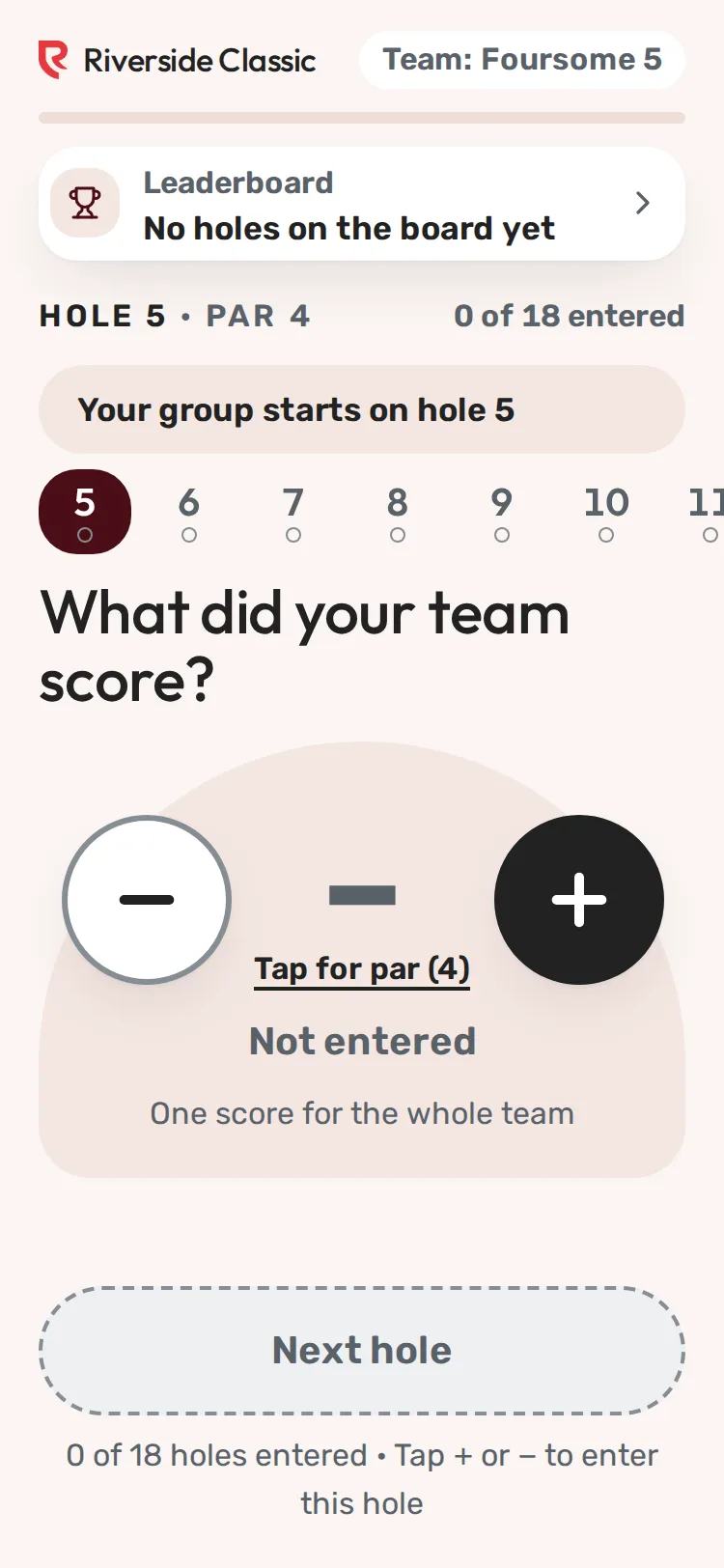
Step 1 of 6: Open your scoring link. It shows your team and the hole you start on.
Sample event. Not real data.
You score on the phone in your pocket. Open your group's link, enter one hole at a time, and the leaderboard updates as you go. No app, no login.
You will need: your scoring link (text, email or the QR code on your cart).
Steps
- Open your scoring link. The top shows your team, a progress bar and Hole [n] · Par [n]. You start on your group's starting hole.
- Enter the score. The empty score says Tap for par ([n]). One tap enters par. Then tap − ("Subtract one stroke") or + ("Add one stroke") until the number is right. The words under the number say what it means, for example "−1 Birdie".
- Scramble: one score for the whole team (What did your team score?).
- Other formats: a row for each golfer (Enter each golfer's score), each with its own minus and plus. Everyone made par fills every empty row with par.
- Tap Next hole. The hole is saved and the next one opens.
- If you didn't change the par that one tap entered, you're asked You did not change this score. Tap Yes, par or Change score.
- A very high number asks That is a lot of strokes. Tap Yes, that is right or Change score.
- Go back to any hole by tapping its number in the strip of holes. The current hole is filled in, and holes with a dot are done. Back to hole [n] goes back one hole. A change saves when you move to another hole.
- On the last hole, the big button says Send final scores. Tap it, then tap Send scores. (Keep checking lets you look again first.)
What happens next
- You see Round complete with your total. See the leaderboard shows where you finished.
- If gifts are open for this event, you may see Add a gift for [charity]. It's optional; No thanks closes it.
- If the organizer allows it, Fix a score lets you correct a hole later. See Fix a score you entered.
More than one phone in the group
Several people can score the same group. Every phone shows the same card. When someone else changes a hole you see Updated from another phone in your group: hole [n]. Agree on one person per hole to avoid back-and-forth.
Common problems
| What you see | What to do |
|---|---|
| Saved on this phone. | You have no signal. Keep going; it sends later. See Score when you have no signal. |
| Hole [n] could not be saved. Show this screen to the tournament organizer. | Show it to the organizer or a volunteer; they can enter the hole. |
| Hole [n] was already updated with a newer score, so we kept that one. | Someone else in your group changed it after you. Check the hole and fix it if needed. |
| Next hole is greyed out | Enter a score for this hole first (Tap + or − to enter this hole). |
| This scoring link isn't working. | See What if my link doesn't work. |
Still need help? Your tournament organizer can fix this. Reply to your confirmation email (replies go to the organizer), or ask at the check-in desk on the day.
Screenshots show a sample event. Not real data.