
Score a hole
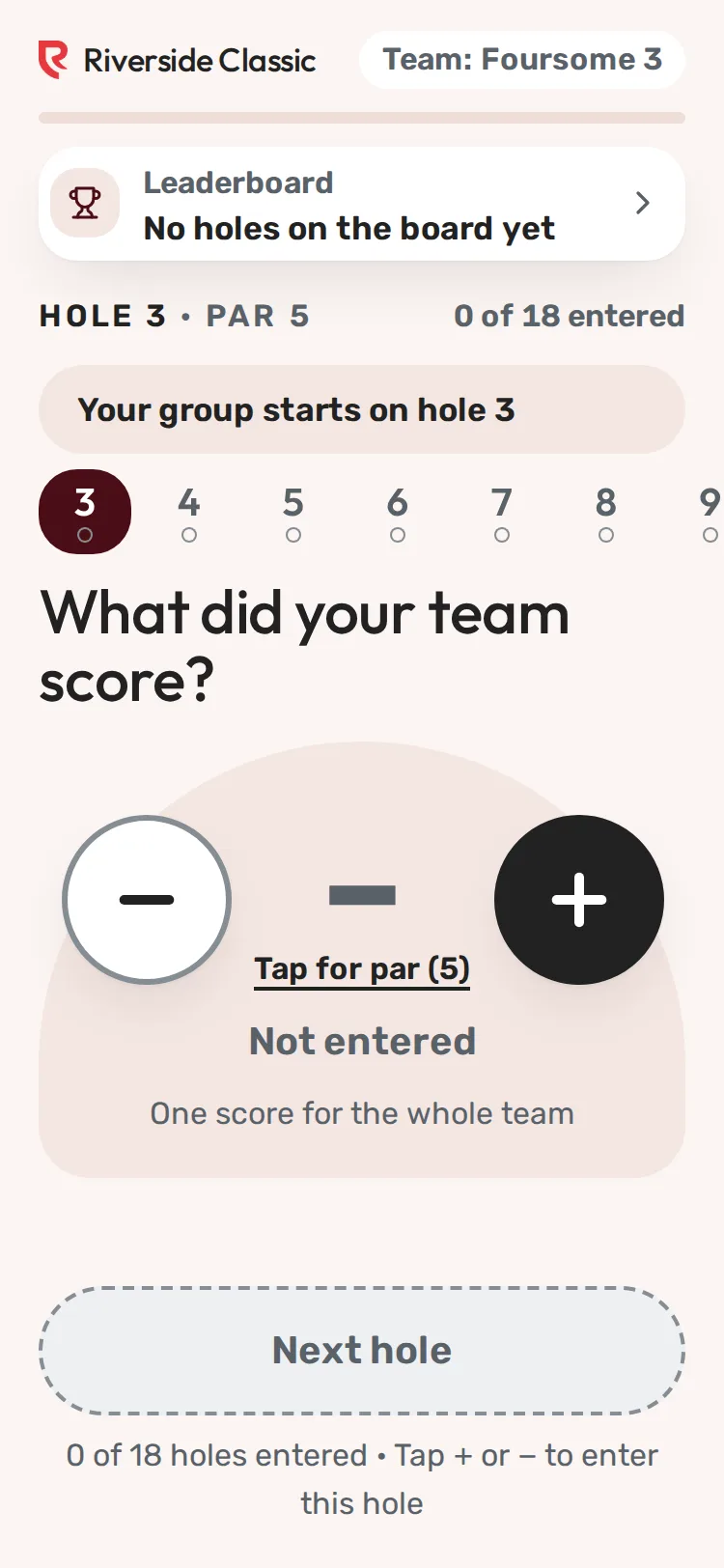
Step 1 of 5: The card opens on your group's first hole. Tap the dash to enter par.
Sample event. Not real data.
Each group scores on a phone, one hole at a time, from a link. No app, no login, no password. Every saved hole shows on the leaderboard within seconds.
The short version
- Golfers open their group's link or scan the group QR, enter the score for each hole and tap Next hole.
- The leaderboard updates as each hole is saved.
- You watch progress on the Scoring page: Not started, Thru and a number, or Complete.
What a golfer sees, step by step
- The card opens on the group's first hole. In a shotgun start that is the group's starting hole, and play goes around the course from there (a group starting on 12 plays 12 to 18, then 1 to 11). The top shows the event, the team name, a progress bar, the team's place on the leaderboard, Hole and Par, and how many holes are entered.
- Enter the score. The empty score is a dash with Tap for par. One tap enters par. Then minus and plus change it one stroke at a time. Under the number, words say what it is (for example "−1 Birdie"), so nobody has to rely on colour.
- In a scramble, the card asks "What did your team score?" and takes one team score per hole.
- In other formats it asks "Enter each golfer's score", with one row per golfer and an Everyone made par button.
- Tap Next hole. The hole is saved and the card moves to the next hole in order.
- Checks that catch mis-taps.
- If the number was never changed from par, the card asks "You did not change this score. It is par. Is that right?" with Change score and Yes, par.
- A very high number asks "That is a lot of strokes." with Change score and Yes, that is right.
- Go back any time. The row of hole numbers near the top shows every hole in playing order. Entered holes have a dot. Tap a number to jump to that hole. Back to hole goes one hole back. A changed hole is saved when you leave it.
- The last hole. The big button says Send final scores. The card asks "Send your final scores?" with Keep checking and Send scores.
- Round complete. The card shows the total strokes and the score against par, a See the leaderboard button and, if you allow it, Fix a score.
When signal is weak
The phone saves every hole on the phone first, then sends it. With no signal the card says Saved on this phone and how many holes are waiting, and sends them by itself when signal returns. Send now tries again at once. After the page has opened once with signal, it opens again even with no signal. See A score won't save.
Several people scoring one group
Every link for a group opens the same card, so two or three people can score. Each phone checks for the group's saved scores about every 15 seconds and says so when a hole was changed on another phone. See Several people scoring the same group.
Choices you control
| Setting | Where | What it does | Starts |
|---|---|---|---|
| Allow score edits | Event settings, Scoring | Lets golfers fix holes after they finish | On |
| Show leaderboard publicly | Event settings, Display | A private board (with a code) also hides the team's place on the scorecard | On |
| Starting hole or tee time | Pairings, group card | Where the card starts | From pairings |
| Pars | Event settings, Course & scorecard | Par on each hole | Par 4 until set |
What Redswing does not do
- No app download, account or password for golfers.
- No GPS, yardages or shot tracking.
- No automatic tiebreak. Teams with the same score share a place. See Ties and disputes.
- It does not close scoring at a set time. Links keep working after the round.
Do this next
Screenshots show a sample event. Not real data.