
Put a walk-up golfer into a group
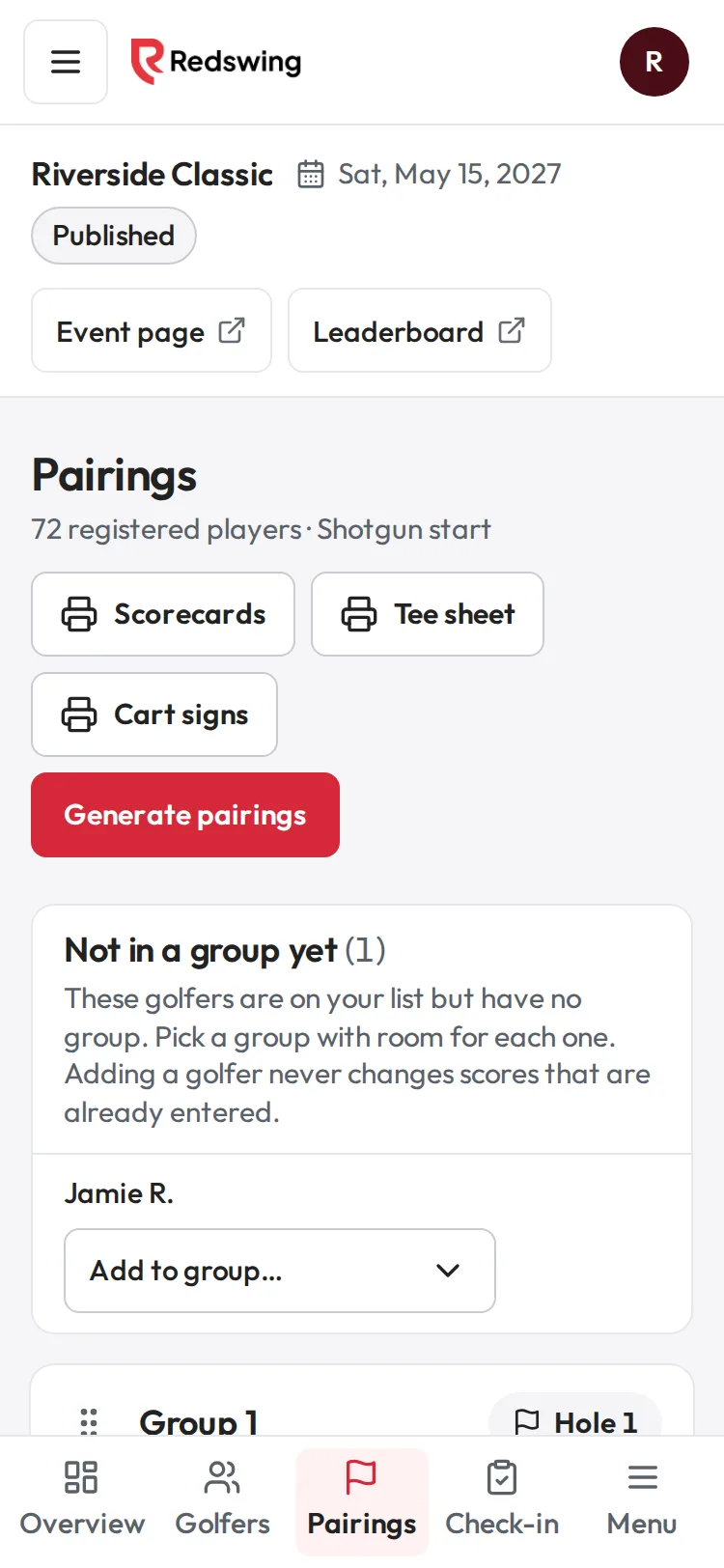
Step 1 of 2: Golfers you added who aren't in a group yet are listed at the top of Pairings.
Sample event. Not real data.
Someone shows up who is on your list but has no group. Put them in a group with room. This works at any time, including after scoring has started.
Who can do this: Admin or Editor. You will need: the golfer already on your Golfers list. If they are not, add them first: Add a golfer by hand.
Steps
- Open Pairings.
- At the top, find Not in a group yet with a number. It lists golfers who are on your list without a group.
- Open Add to group… next to the golfer's name.
- Pick a group, like "Group 18 (3 of 4)". Only groups with room are listed.
- A message says the golfer was added to the group.
What happens next
- It only adds the golfer. It never changes or deletes scores already entered, and it never makes a new group.
- The golfer becomes captain only if the group was empty.
- Reprint the group's scorecard and cart sign, and make sure the group's scoring link reaches the new golfer.
Common problems
| What you see | Why | What to do |
|---|---|---|
| "All groups are full. Remove a golfer or move one to make room." | Every group is at team size | Move someone, or remove a no-show on Golfers. |
| "That golfer is not on your list any more." | They were removed or refunded | Add them again on Golfers. |
| "That group is full" | Someone else just filled it | Pick another group. |
| I cannot make a new group | New groups cannot be made once scoring has started | Use a group with room. |
Related
Screenshots show a sample event. Not real data.